Today we can choose from a variety of
IM (instant messaging) programs. There are more and less popular clients (programs that users use to chat). Here are some popular clients:
MSN messenger, Yahoo messenger,
Gtalk,
Skype, Jabber,
ICQ, etc. Each client connects to their own network, where users can chat with each other. But there are also so called "
multi network" clients, which can connect to more than one network, like
Trilian or
Gaim. They are useful to those who own more than one
IM account. But I will not talk about them.
But, as the title says, I'll write about this new client, which bonds GOOGLE users together and it has evolved to a pretty nice program.
Why I like
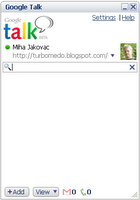
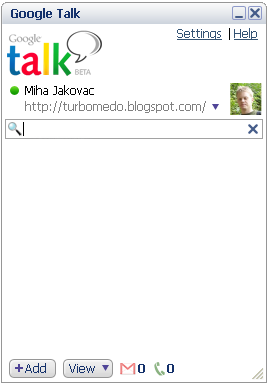
Gtalk? First, it has clean, sleek and compact user interface, with no unnecessary buttons, icons and banners. Setup file is 1,5 MB large and that also gives you a clear picture what's inside the package. The truth is,
Gtalk is very fast. It loads in less than a second and program is very responsive. All functions are positioned well, so you can use them as quick as possible. Newest functions, worth to mention, are File Transfer and Voice Mail. If you are using any
IM client, you know that file transfer comes very handy. I didn't notice any file sending problems, it's fast and reliable. Second feature is Voice Mail. If the user you want to contact, is not online, you can leave him a message. Great thing is that voice is recorded as MP3 and send to the user email. It's nice to have all voice mails to MP3 format. This way you can store it for later use or whatever. Neat, indeed!
Now, let me write something about general features, like text and voice chat.
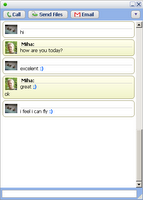
Text chat is an eye candy and very customizable because you can choose from various chat styles. You can choose plain style, bubbles or bubbles with pictures, etc. Check out the screen shot. When
Gtalk came out it was a bit dull. Voice chat is also great, because the sound is very clear.
As you can see from the screen shots, you can also set your photo and custom messages beneath the nick name. If you want to show what you are listening, you can also turn that option on. I have tested this feature on
Winamp and Windows media player, and in both cases works great, without any additional plug ins.
At the bottom line, if you are gmail user, you must have
Gtalk. Why? Firstly, you have an instant access to gmail account (if you do not use any EMAIL client), no need for user name and password
login, because when you are connected on
Gtalk, you are connected to gmail. When you get an email, a pop up is shown and
Gtalk icon changes. With a click on the icon, default browser starts and you are in your inbox in seconds. You can also set that all chats are stored on your gmail. This way you can read them from anywhere.
Finally there are also some things I would like to see in the future. Conference text and voice chat are the "must be" features. Maybe some pack of smileys would also be a good thing. No mambo, jumbo, nudge and flashy thingies! This is all crap. Something like
skype pack would be nice. Let's wait and see.
PROS: great user interface, easy to use, reliable and fast, good voice mail philosophy, good voice chat sound,...
CONS: no conference text chat and voice chat, no smileys pack
SCORE: 8/10
Bellow, you can get more information about customization of Gtalk.
- Website Customize Talk. Some customizations of Gtalk.
- Gtalk Profile website. What the hell! There you can create a profile with your info and then wait for someone to contact you... What is this site about? Users are signed and their profiles are available to others. This way you can meet new people. Use the world map and click on different countries. Oh, it's so fun.
- Spread the Google Talk website. I must say, Gtalk is getting popular as drinks that look like beer ;). Good work!!
- ...well, of course here are some registry tweaks (yeah, I know...). Check them here. I'll put a tool for those tweaks as soon as possible. Must warn you that I didn't test them.


 Why I like Gtalk? First, it has clean, sleek and compact user interface, with no unnecessary buttons, icons and banners. Setup file is 1,5 MB large and that also gives you a clear picture what's inside the package. The truth is, Gtalk is very fast. It loads in less than a second and program is very responsive. All functions are positioned well, so you can use them as quick as possible. Newest functions, worth to mention, are File Transfer and Voice Mail. If you are using any IM client, you know that file transfer comes very handy. I didn't notice any file sending problems, it's fast and reliable. Second feature is Voice Mail. If the user you want to contact, is not online, you can leave him a message. Great thing is that voice is recorded as MP3 and send to the user email. It's nice to have all voice mails to MP3 format. This way you can store it for later use or whatever. Neat, indeed!
 Text chat is an eye candy and very customizable because you can choose from various chat styles. You can choose plain style, bubbles or bubbles with pictures, etc. Check out the screen shot. When Gtalk came out it was a bit dull. Voice chat is also great, because the sound is very clear.
